
Edited by
M. Ibrahim

Reviewd by
Abdul Qadir

Edited by
M. Ibrahim
Reviewd by
Abdul Qadir
Freelancers can use AI tools to write quickly, find information, generate design ideas, automate tasks and deal with clients. But if you have too many subscriptions, it may be a drag on profitability and not provide much value. The budget will depend on monthly income, workload, services and time saved per tool.
There is no fixed industry standard for how much freelancers should spend on AI tools as it is dependent on the needs of freelancers. Free tools are the right choice for beginners and if you are an established freelancer, you might want to consider paying add-on subscriptions of 60 monthly for essentials. Experts who use the advanced creative or technical features will have higher expenses if they have lots of work to do.
A starting budget of $0 to $15 a month for novices, $10 to $30 for part-time freelance writers and $20 to $60 for many freelance writers. The higher the level of the creative or technical tools used the more expensive a specialist will be, running 150 or more. These are recommendations of budgeting ranges, rather than industry averages. They include subscription costs and not taxes, API usage or extra fees.
| Freelancer type | Suggested monthly budget | Recommended approach |
|---|---|---|
| Beginner | $0 to $15 | Start with free plans |
| Part-time freelancer | $10 to $30 | Pay for one frequently used tool |
| Established freelancer | $20 to $60 | Combine an AI assistant with a specialized tool |
| Specialist | $60 to $150+ | Invest in advanced features that support paid work |
The monthly budget needed is based on freelance income, workload and the worth of each subscription offered. A $ 300-a-month freelancer will have different priorities when it comes to money than a $ 3,000-a-month guy. The one thing that is great is to test 2-5% of freelance monthly income. This is a guide for planning purposes only and is not a benchmark for the industry.
| Monthly freelance income | Example AI budget | Share of income |
|---|---|---|
| $300 | $5 to $15 | 1.7% to 5% |
| $800 | $16 to $40 | 2% to 5% |
| $1,500 | $30 to $75 | 2% to 5% |
| $3,000 | $60 to $150 | 2% to 5% |
These are not necessary spending limits, but rather spending limits to consider. Some people might need multiple $20 subscriptions if they’re a writer for instance and if you’re a video editor, you might want to have more creative software.
The cost of a reasonable AI tools budget for freelancers includes subscription services that can benefit you regularly and will offer more value than their cost. An AI assistant, for instance, to organize research and edit content drafts might be purchased by a content writer. A designer might like to use a visual creation tool. A freelancer doesn’t need to have both subscriptions automatically.
Use the smallest budget that you can rely on to provide good client work. Only add it when there is a clear need or problem that a paid feature addresses, or when it enhances productivity.
Five factors help freelancers decide how much to spend.
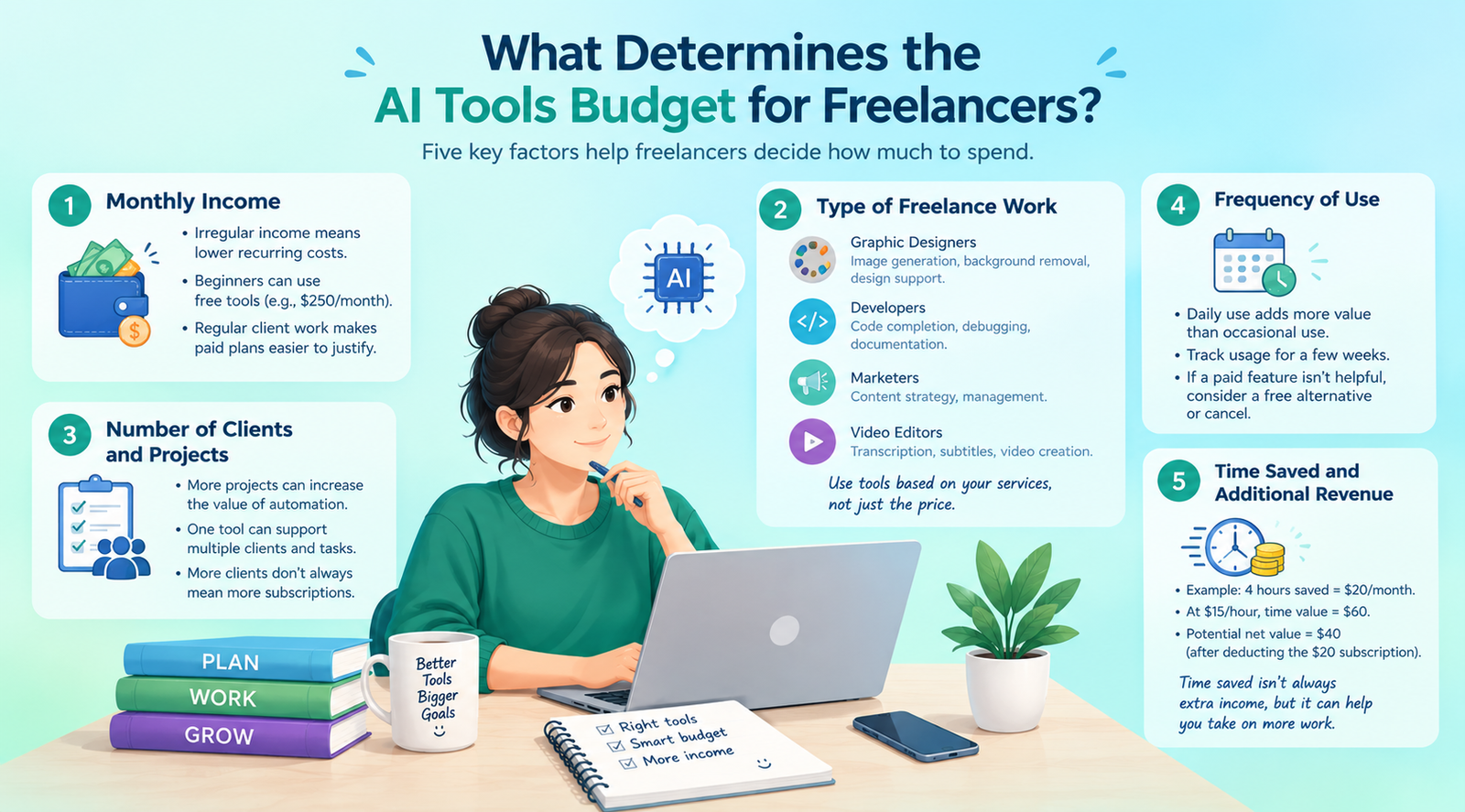
The amount of spending you can do depends on your income. Recurring costs are especially advantageous for freelancers who do not have a steady income, especially during their off-seasons. For those who are just starting out and making $250 from the odd project every month, free tools can be used. When client work is regular, then it becomes easier to make a case for paying for a plan.
Various AI capabilities are needed for various services.
Use tools based on your services rather than what you pay for because you don’t use it.
The more one has, the more value in automation. Someone who writes 10 articles per month could get more value out of getting some research help than someone who does two quick articles. But more clients don’t necessarily require more memberships. There may be multiple projects that use one tool.
With a daily subscription, there are more chances to add value than there are with a tool opened on a monthly basis. Monitor for a couple of weeks. When it comes to client work, the paid feature may not often be of benefit, so it might be better to cancel or get a free alternative.
Imagine that an AI application saves four hours for a cost of $20 per month. If you’re charging $15 per hour for your billable time, the potential time value is $60.
Calculation: 4 hours × $15 = $60.
The net value may be up to $40 after deducting the $20 subscription. This is provided you make use of the saved time wisely. Saving time isn’t necessarily an extra income opportunity.
The freelancer AI stack cost per month will be based on the number of subscriptions, what features are needed and the options for payment.
For instance, if you subscribe to ChatGPT Plus for a month at a time, the subscription is $20 per month. Priced at $12 per month (or $18 per month monthly in the United States), Canva Pro is available. Adobe Firefly is available in several plans and their prices or the features they provide vary. Please refer to official information for up-to-date information.
| Freelancer setup | Tools or capabilities | Estimated monthly cost | Best suited for |
|---|---|---|---|
| Free starter stack | Free AI assistant and design tools | $0 | Beginners |
| Writing stack | ChatGPT Plus | $20 | Writers and marketers |
| Design stack | Canva Pro with annual billing | $12 equivalent | Content designers |
| Writing and design stack | ChatGPT Plus + Canva Pro annual equivalent | $32 | Content creators |
| Advanced creative stack | Main AI assistant + specialized creative subscription | Depends on selected plans | Designers and video creators |
A combination of $32, which includes ChatGPT Plus for $20 per month and Canva Pro’s annual price of $144 divided by 12. The annual fee for Canva is paid in total, so the monthly amount isn’t necessarily the monthly payment. The price can be different in various areas and depending on tax. These are just some setups that a freelancer may have; not all the setups that every freelancer will need.
Free plans can be beneficial when trying out a tool and finishing up with some sporadic jobs. They might be restricted on the number of messages, number of images, uploads of files or other advanced features.cIf there’s a tangible constraint that goes away, then paying for the plan is appropriate. Before upgrading, verify the limits, terms and fees for usage.
Freelancers need to select the subscriptions based on their earnings and workload. While more income allows more to be put to better use in investments, it does not justify buying “tools” that are not needed.
The basic plan is from $0 to $15/month. Simple brainstorming, research, outlining and design are typically included with free tools. For instance, those who are new to writing and making $300 per month are eligible for a free AI assistant and a free design platform. When the time saving from a paid subscription is sufficient to enable more client work.
If someone is working part-time for approximately $800/month, then they can look at a budget between $16 and $40. While there is one assistant to help with the regular work, there are some free tools to help with occasional tasks. For instance, a social media freelancer can begin out with a writing assistant that is paid and a free design platform.
If your freelancer is fairly competent at 3,000 a month, you can think of spending 150, depending on the services that they offer. It is possible to be productive with just one subscription. If a designer is creating a lot of custom graphics, they may want to consider adding more features to their designs. The right budget should be related to business requirements rather than income.
The AI stack cost 1 person differs from the cost of supporting a team. Independent work can be done in individual plans and shared workspace, administration and collaboration features are available in business plans. Additionally, the cost of AI tools cost for 1 person vs 5 people varies based on the pricing policies of the AI service providers. Some plans require a minimum number of seats, others require payment per user and some have other terms.
Using ChatGPT Plus at $20 per user per month as an example:
| Setup | Number of users | Estimated monthly cost | Cost per person |
|---|---|---|---|
| One individual subscription | 1 | $20 | $20 |
| Five individual subscriptions | 5 | $100 | $20 |
| Five-person team using individual plans | 5 | $100 | $20 |
| Five-person business plan | 5 | Verify current pricing | Depends on plan |
The $100 total is five individual subscriptions at $20 each, not a quoted business-plan price. Taxes and additional usage charges are excluded.
Independent contractors who self-run their projects may use separate plans. A business plan may be suitable for a group where they need to be centrally administered, share workspaces, or have organization-level controls. Look at the total cost, minimum seat requirement, usage included, privacy policy and features offered before you make your decision. It doesn’t necessarily cost less to have a team plan.
There are a number of freelancers who can get by with just a single AI tool and only supplement with specific tools as needed. The idea is to fix particular issues without having to pay for unnecessary similarities.
AI helpers can be utilized for brainstorming, outlining, organizing research and editing assistance in writing. There is a place for human oversight for accuracy, originality, brand voice and client needs.
Research tools aid freelance writers in gathering information and structuring the sources. Check the reliability of facts and authentic sources before applying them to client projects.
Designers can utilize tools to create, modify, remove backgrounds and make social media images. Before delivering assets created with usage credits to clients, review the commercial-use terms.
Coding assistants for debugging, testing and documentation may be beneficial for developers. Go with the plan as per the programming languages and complexity of the project.
Automation tools can help eliminate repetitive tasks, like creating reports or sorting information. Always go with the built-in features first and then add on another service if needed.
A beginner content creator can use a free AI assistant, a free design tool and a spreadsheet to work on a project. AI cost continues to be $0/month. For clients that require it, an established content specialist can use ChatGPT Plus for $20 per month and add on a creative tool if warranted by client requests. The total number is dependent on the actual cost of the second tool.
Knowing how to choose AI tools based on freelance income helps freelancers avoid unnecessary subscriptions. Check out all of the products before making a purchase.
Identify the task that is too time-consuming or causes frequent problems like research, editing, making images, coding, etc.
The daily subscription offers more opportunities to do something valuable than does an occasional project. If available, try the free version first.
Use this formula:
Monthly time value = Hours saved × Hourly billable rate
Suppose a freelancer earns $20 per billable hour and a tool saves three hours per month.
The calculation is based on the assumption that the freelancer can make use of the saved time. It is not a sure bet for profits, but a possibility of value.
Look into whether there is existing software with similar functions. However, if the additional subscription does the same thing as your primary tool, it may not be worth your while.
Review monthly and annual billing, renewals, credits used, cancellation policies and more. Test out monthly billing first, then commit to a larger annual payment.
The term how to reduce monthly AI subscription costs is directly relevant to freelancers who want to maintain their profitable business while minimizing costs.
Try out the features and simple tasks using free versions. Don’t upgrade unless there is a definite restriction to your work.
Check out the reviews monthly. Discontinue products that you don’t use often or that are no longer available to support your products.
There are two AI assistants that could provide writing, research and brainstorming capabilities. Only store the two if each one offers a unique value.
Monthly plans are flexible and allow you to try out a tool while you decide whether or not it’s right for you. After determining its value, you can then do the research on pricing per year and the initial commitment.
Some tools have credits or generation limits, or have additional fees for API usage. Read through the full terms of the price, rather than using just the price stated.
Things change with your services and needs. A subscription may no longer be needed after a project is done.
Here are some tips to ensure that your subscription costs don’t get out of hand.
Now assume that a freelance writer works for $1,000 per month and has a monthly allowance of $30 for AI.
| Expense | Monthly cost |
|---|---|
| Main AI assistant | $20 |
| Design tool | $0 using a free plan |
| Unused budget | $10 |
| Total AI spending | $20 |
The writer doesn’t purchase another subscription, but instead takes the $10 as a gift. If in the future, a writer can save time in the client project using a paid design tool, he/she can use some of the remaining money to test it.
How Much Do Freelancers Spend on AI Tools depends on income, services, workload and the value each subscription provides. For the beginners, it is possible to start free and many of the established solo freelancers can test a budget of $20 to $60 per month.
The amount of money that every freelancer can spend varies according to his or her specialty. Even when two people are earning the same amount, writers, developers, designers and video editors have different needs.
Check current subscriptions, find out how much time they save and cancel products that don’t make sense for the price. Do not add another paid tool unless it’s a real issue or is helping to achieve a better business outcome.
The beginner level is available in the range of $0 to $15/month. There are lots of basic features available in free tools and if you do need to pay and it enables regular client work or takes away a positive thing, it is worth the while.
Many successful single freelance workers can start out at 60 a month. There is no fixed amount, as it varies according to income, services, uses and value of the tools.
Even many freelancers can begin using one principal AI assistant and free tools to accomplish the remainder of the work. Only subscribe when they offer unique features that can make for a paid business.
Yes. The free tools can be used to help brainstorm, conduct simple research, draft, design and organize the project. Only paid plans come in handy when the use restrictions or extra features impact the quality of the work or time delivered.
Where possible, use free plans, cancel unused subscriptions, avoid unnecessary tools, compare the billing options and watch for additional usage fees. Check for subs monthly to ensure they don’t become unaffordable.